Brief
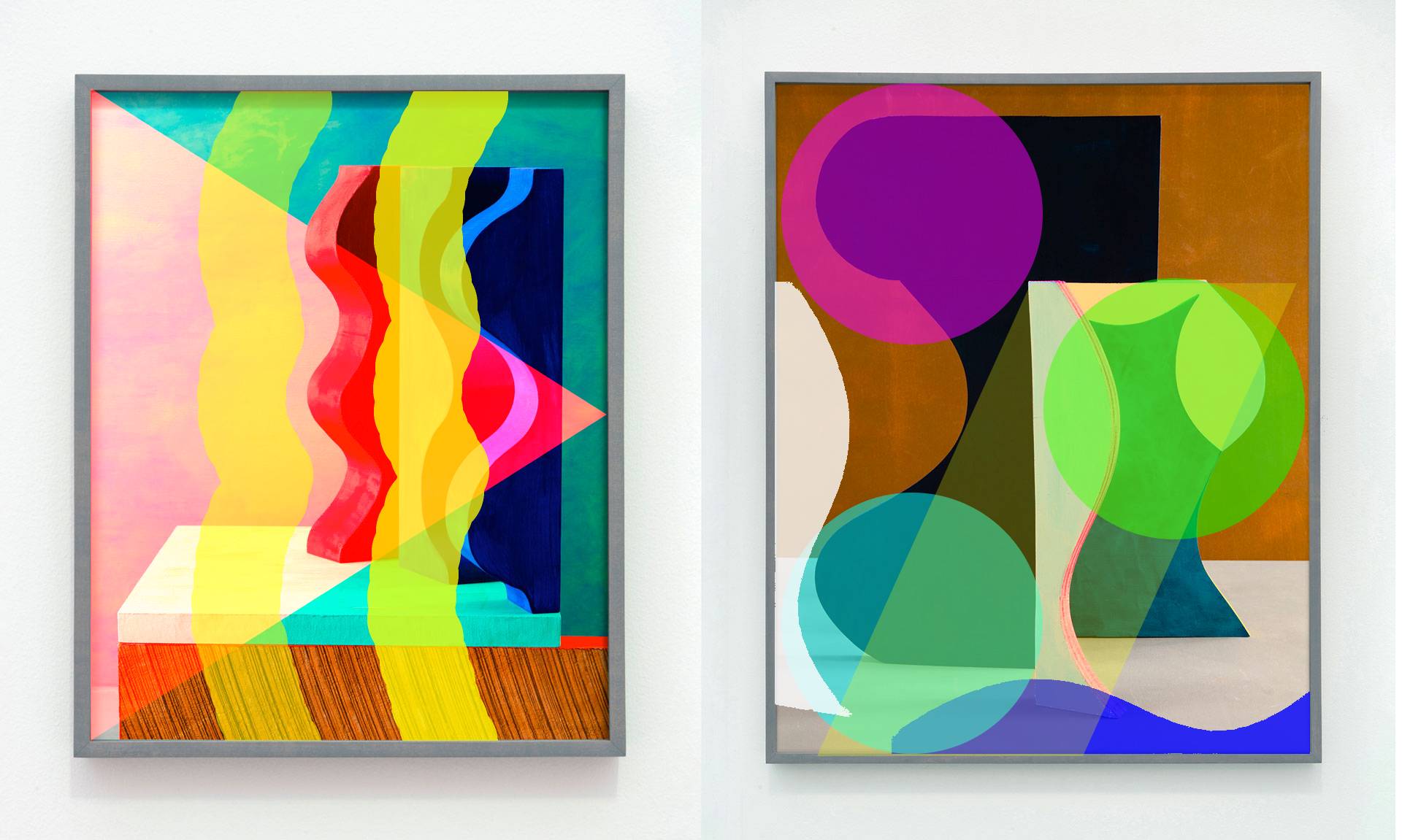
Take two of your favorite compositions from the 3D/2D project and import them into PhotoPea. Add transparent overlays in different shapes to create four new studies—two new transparency studies per original composition.
Next, select two of your favorites from the transparency studies. Using paint, paper, an X-acto knife, and a gluestick, translate these two PhotoPea studies into physical form to create “false transparency” compositions. Match the colors from the PhotoPea studies, do not alter them. This is partly an exercise in color matching.
Use your acrylic paints to match the colors you see on your screen—creative swatches of color you can cut to the right size and glue down to your larger sheet of paper. Do not paint over your collage! Your new collages should be no smaller than five inches at their largest dimension and placed neatly on a larger sheet of paper.
Materials
- Paper
- Pencil
- Acrylic paints
- Painter’s knife
- Brushes
- Disposable palette
- Cups or jars for water
- Rags or paper towels for clean up
- Soap or shampoo for cleaning brushes
- Scissors and/or X-acto knife
- Cutting board / self-heealing mat
- Glue and/or tape
Example
Deliverable
Upload all six of your images to the Google Slides template (see link at top of the page) for this assignment under your name. If you can, place your digital transparency image on the same slide alongside your physical collage that is replicating it. If they don’t fit neatly next to each other, place them on neighboring slides.
Grading
Assignment grades will be based on the following:
- Aesthetic Principles (40%)
-
Student demonstrates evidence that they understand and inventively integrate aesthetic principles.
- Excellent: Student employs the aesthetic principles addressed in class to create work that is individual and engaging.
- Average: Student is able to rotely employ the principles addressed in class to create a standard project, but not make it their own.
- Below Average: Student struggles to demonstrate a grasp of the principles and shows no facility in internalizing the ideas.
- Labor and Technique (40%)
-
Student works fastidiously to apply appropriate techniques to the project and shows a growing facility with those techniques. The student’s labor is evident and ample given the allotted time.
- Excellent: Student understands demonstrated techniques and nimbly employs them in their work.
- Average: Student makes some stylistic and technical mistakes by ignoring provided guidance.
- Below Average: Student repeatedly makes the same mistakes and ignores instructor input and suggestions.
- Following Instructions (10%)
-
The student adheres to the guidelines provided for the course and the assignment. If the project has a particular framework, the student adheres to that framework. If an assignment is to be submitted on a Google Slide, the student does not email the instructor a JPG.
- Excellent: A detail-oriented student who takes instruction and fastidiously executes it within their work.
- Average: A student who misses some details because they didn’t read instructions thoroughly or take proper notes when instructions were given.
- Below Average: Student ignores basic instructions and guidance given for assignments.
- Reflection (10%)
-
Student notes on critiques along with personal reflection on their projects show a growing sense of awareness of how their work can be received and understood.
- Excellent: Student diligently takes notes during critiques, noting the core concerns of the critics, and expresses their own views thoughtful and honest self assessment.
- Average: Student’s critique notes address only surface concerns and/or their own self reflection writing is hurried and vague.
- Below Average: Student does not take good notes and their self assessment is incomplete or dishonest.
- On-time Submission
-
Work that is not present for a synchronous critique, or is too late for an asynchronous critique will lose points under the Reflection category for not having notes from the critique.
Why?
Color matching is a crucial skill, not only when working representationally to mimic what you see, but sometimes you need to go back into a painting to touch up an area, and the new paint needs to match the old paint. Trying to mimic a transparency forces your mind to think of the colors abstractly, and not as transparencies so you can recreate them appropriately.
Learning Outcomes Addressed
- Spatial Skills
-
Students will be able to generate, organize and communicate ideas in two-dimensional space using basic principles of color and composition.
- Technical Skills
-
Students will be able to employ various digital and analog techniques to realize and evaluate aesthetic compositions.
- Aesthetic Sensibilities
-
Students will be able to create two-dimensional compositions of varying sensibilities and articulate their appreciation of others’ art.